I've been testing out the new Adobe Camera Raw (ACR)/Lightroom (LR) preliminary support for Sigma DP1 files. Color results are very good. They're as good as what I can manage with Sigma Photo Pro (SPP) and with less time and effort. What about black and white conversions?
First, a few observations about SPP: SPP seems to apply color and luminance noise reduction to RAW files, increasingly with higher ISO. The one way to get around this is to use the "monochrome" white balance setting, which has three consequences besides converting the image to black and whte. First, the luminance NR, which otherwise cannot be disabled, is turned off in this setting. Second, the apparent exposure increases. It's as if SPP is throwing away light as part of the color processing workflow and makes use of that light during B&W conversions. I don't know how or why, but it seems this way. If an image is properly exposed in color, the monochrome WB setting typically requires about a stop of negative EV. If the color image is about a stop underexposed, the monochrome WB setting usually looks pretty good. The third "benefit" of the monochrome WB setting in SPP is that "pushed" results look the same as native increases in ISO. For example, a color image shot at ISO 200 underexposed by two stops and pushed to +2EV in SPP looks blotchy and noisy compared with a color image shot at ISO 800. However, those two images will look identical (or close enough) using the monochrome WB setting. For those three reasons, I've found that I get much better B&W results from the DP1 by using the monochrome WB setting in SPP than I do with a color RAW conversion subsequently processed from TIFF to B&W in Photoshop CS3.
In order to demonstrate the differences between SPP and ACR/LR B&W conversions, I'll use two examples taken today. Both were significantly underexposed and basically worthless in color. The reader may feel that they are worthless in B&W as well, but this is a technical demo not an artistic one.
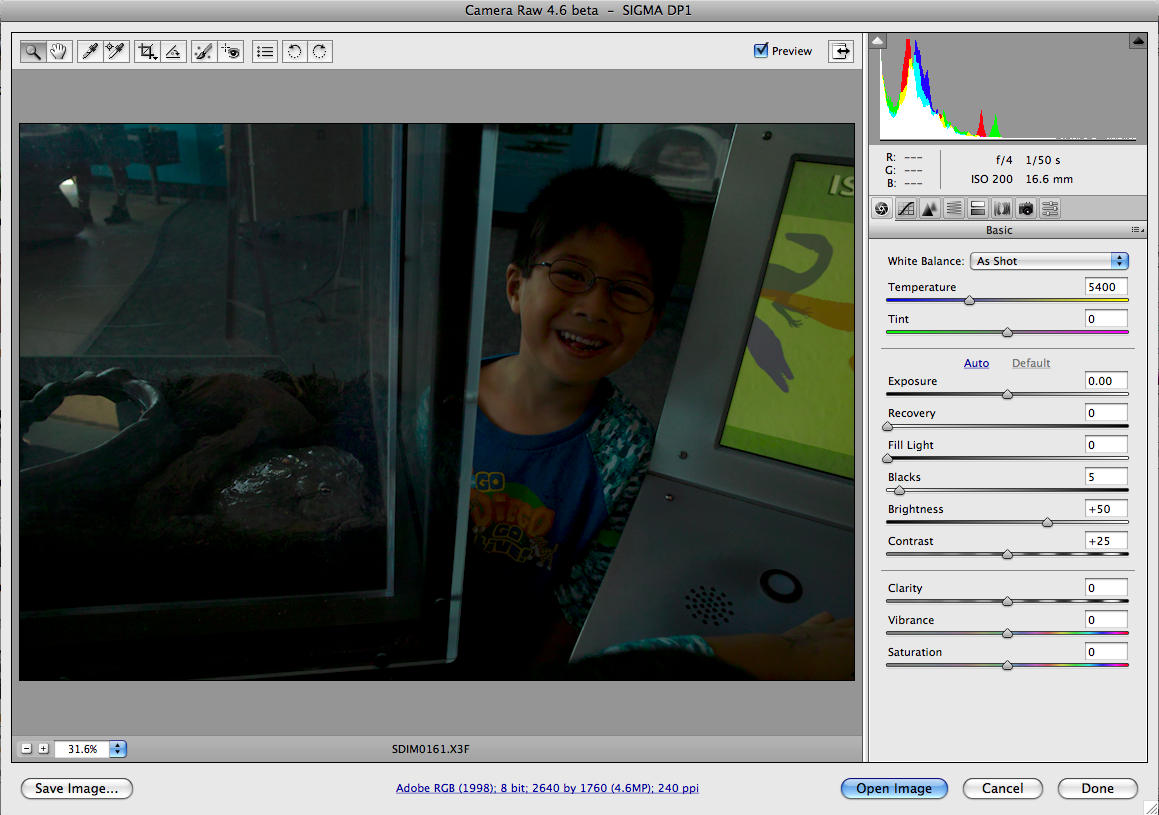
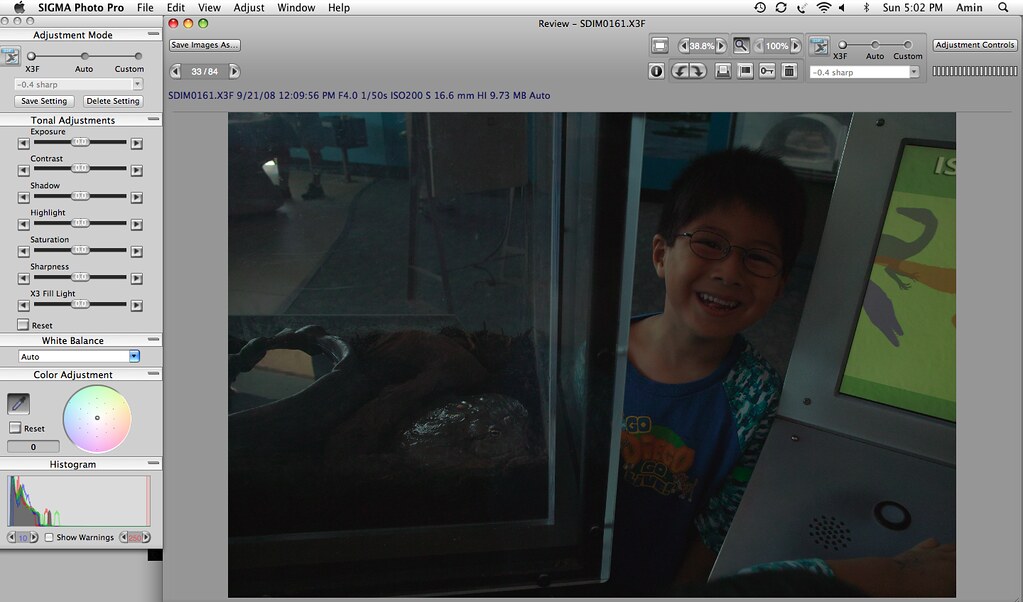
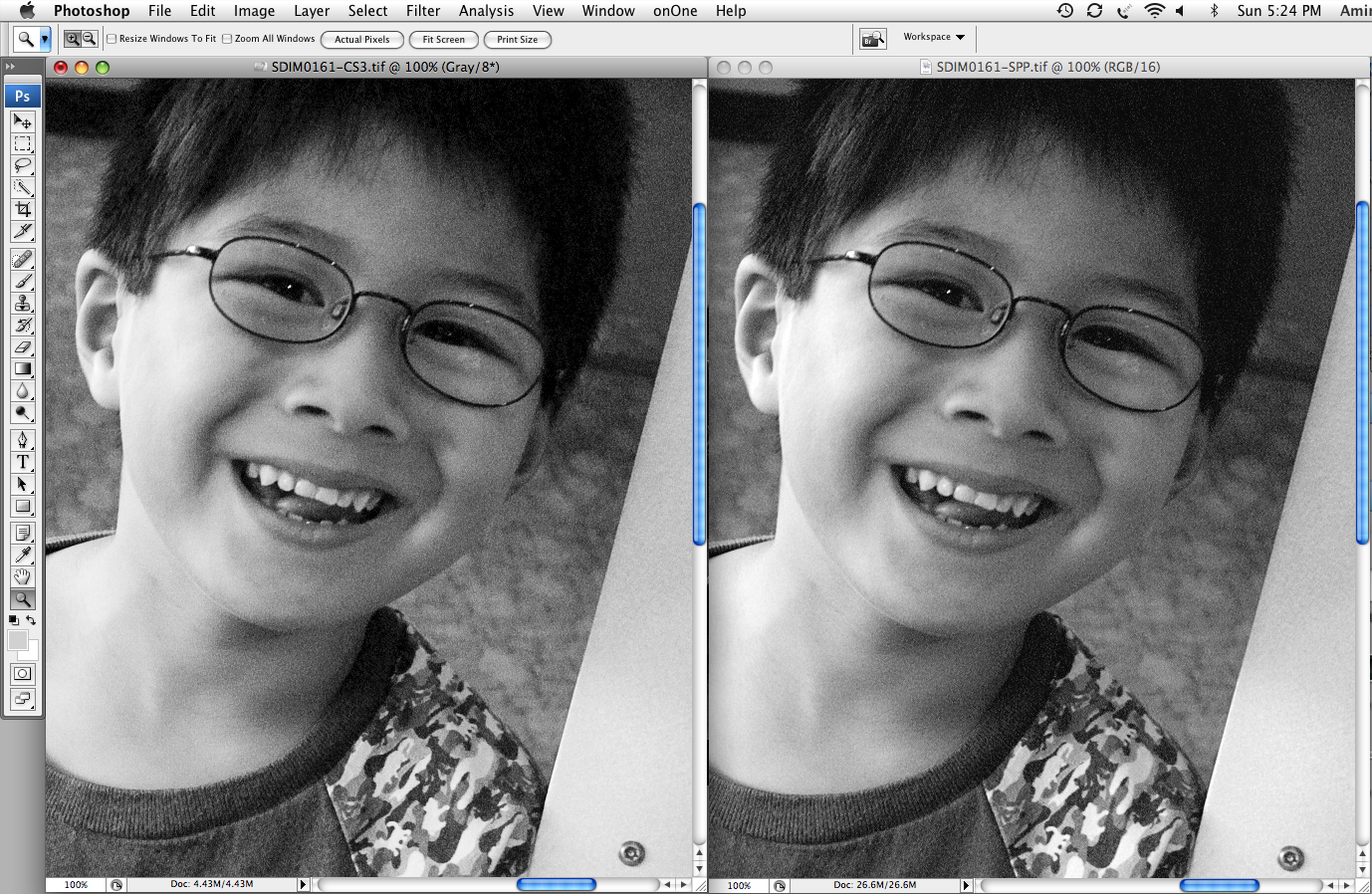
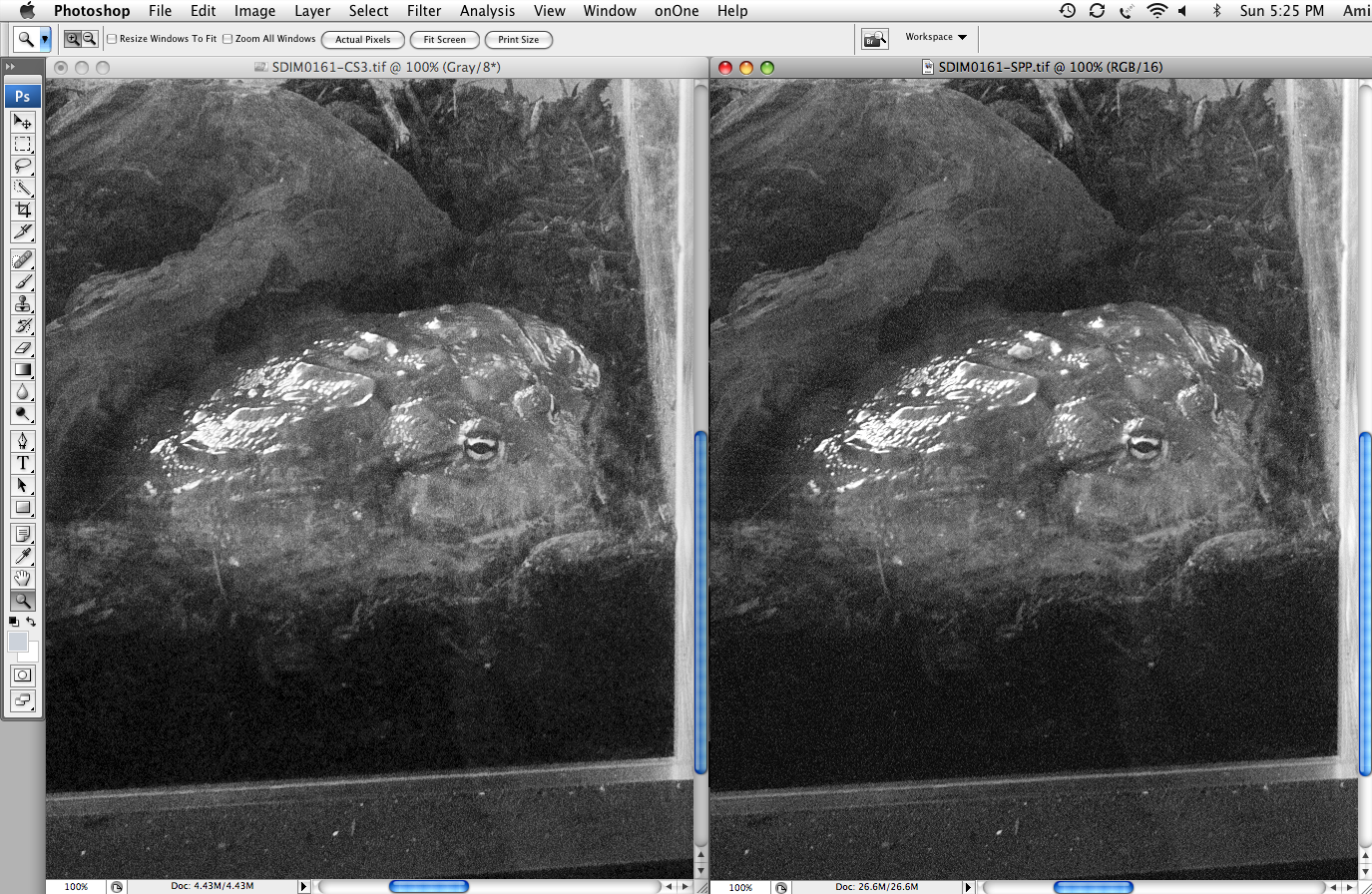
The first example is a photo of my son Oliver showing me a massive African bullfrog. The image was taken at f/4, ISO 200, 1/50s. Here's what it looked like when opened with native settings in ACR and SPP respectively:


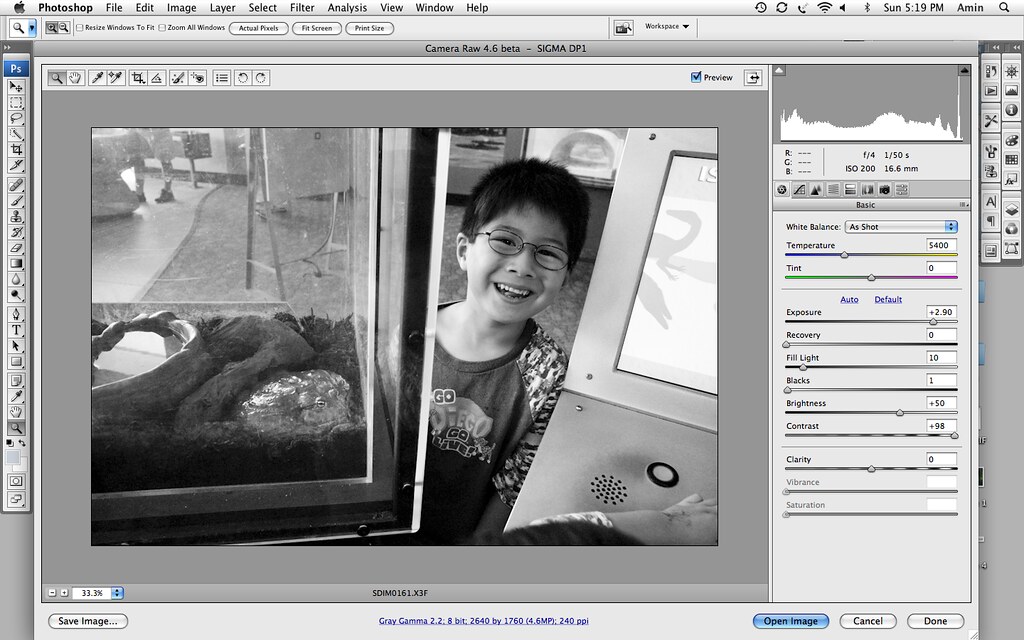
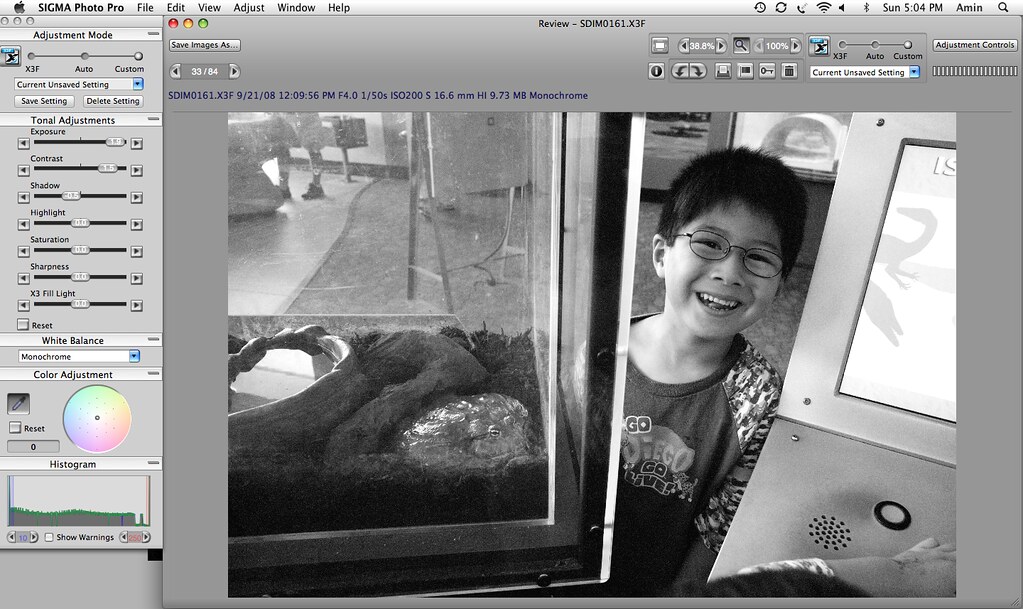
Here you can see that to get a similar look in ACR and SPP respectively, the ACR exposure is at +2.9 EV (~ ISO 1600 equivalent) whereas SPP is at +1.9 EV:
The differences in rendition are subtle, even viewed at 100%. Click the image below to view at the intended viewing size:
The subtle difference, as I see it, is that shadows are smeared a bit in the ACR version. This is more evident in the second (bullfrog) crop above. At any rate, there's little to choose between them.
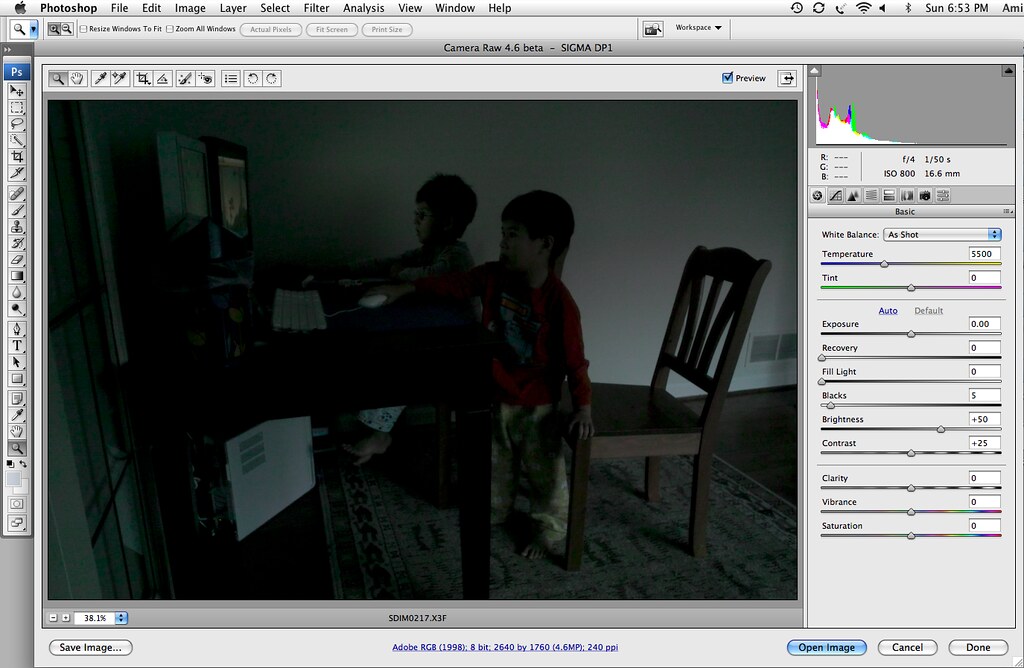
Things get more interesting when pushing the limits of DP1 low light capability. Here is a shot of my two sons taken a few hours ago. The settings were f/4, ISO 800, 1/50s. The light was coming from the computer display, and a bit of light through the window behind them. A you can see from the default color appearance in ACR and SPP respectively below, this was again way underexposed:
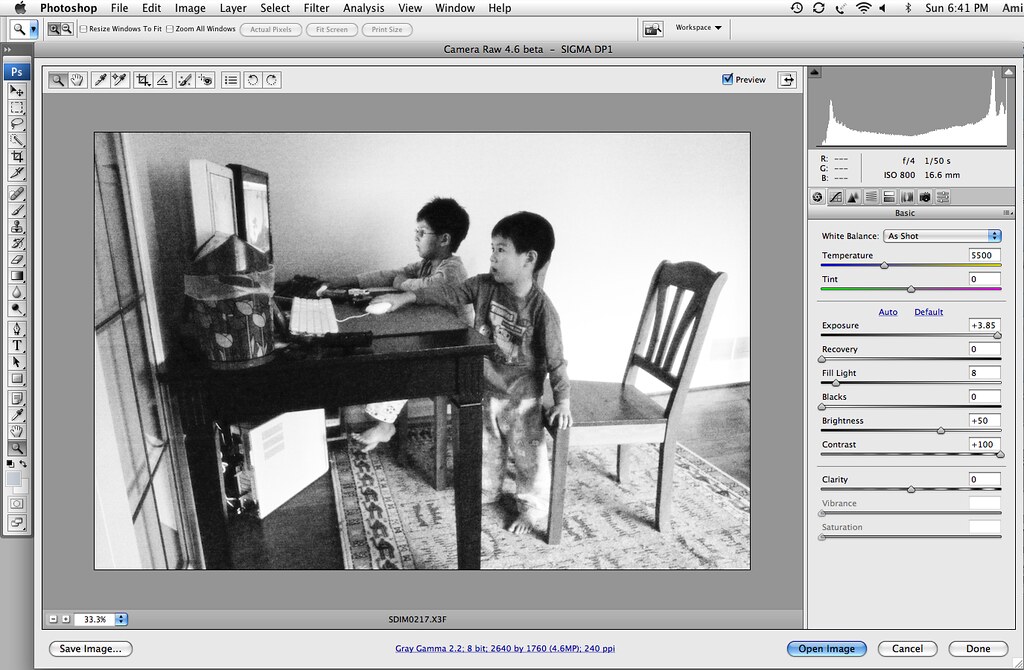
Below you can see that to get a similar look in ACR and SPP respectively, the ACR exposure is at +3.85 EV (Nearly ISO 12,800 equivalent) whereas SPP is at +2 EV. The brightness of the SPP version is compensated by way of the X3F Fill Light at +0.5, and from the histogram I didn't get the files to match exactly. Close enough to make the point:
Here's the key part. Click on the image below to see what the files look like at 100%:
To me, the ACR crop is obviously noise reduced/blotchy. Meanwhile, the SPP crop looks terrible but untouched by NR.
So which is worse? Click the below resized crops to get a rough idea of how these would look after processing, printed to about 8x10" The ACR crop has been sharpened a bit, and the SPP crop has had some Noise Ninja applied. Keep in mind that these are crops from an ~ISO 12,800 equivalent image taken using a pocket camera!
I prefer the SPP process as well as the final look. ACR/LR applies the same sort of mandatory luminance NR to DP1 files, regardless of whether they are processed in color or B&W. SPP puts all color images through a similar NR process to that of ACR/LR. Where they seem to differ is that SPP leaves out the NR during B&W conversions, leaving that as an option for later in the workflow.
The DP1 is a very capable camera for B&W work. My technical examples don't make, and were not intended to make, that point. For low ISO B&W photography, I'd consider switching to an ACR/LR workflow. For high ISO, I'll be using SPP.
Read More......
Posted by Amin
 Labels:
ACR,
black and white,
Lightroom,
Sigma DP1,
SIgma Photo Pro,
SPP
Labels:
ACR,
black and white,
Lightroom,
Sigma DP1,
SIgma Photo Pro,
SPP
Great news for Sigma DP1 users! The latest Adobe Camera RAW release provides support for Sigma DP1 RAW (X3F) files. DP1 RAW support is considered preliminary "due to an unresolved white balance bug that will require additional testing". However, users are reporting good results using automatic WB in camera in tandem with processing the RAW files in ACR.
More information at Lightroom Journal
Get Camera RAW 4.6 from Adobe Labs
[Thanks Britton]
Update: Thanks to kmoon for pointing out that ACR 4.6 fully supports the Nikon Coolpix P6000. There had been widespread concern that Nikon's new RAW format in the P6000 would not be supported by third party developers.
Read More......
Posted by Amin
Labels:
ACR,
Adobe Camera RAW,
Lightroom,
Nikon P6000,
Sigma DP1,
Third party RAW support
Pavel Kudrys posted an excellent comparison of GRD and GRD II images in Ricoh Forum and was kind enough to make the RAW images available for download. There is little doubt to me that the GRD II images look better (more detail, better white balance, etc), though I believe additional samples will be necessary to determine if this improved image quality is consistently observed. I hate to focus on the negative, but I found two things somewhat worrisome. The first and more obvious is that the GRD II ISO 800 and ISO 1600 color in-camera JPEGs look positively freakish. If that is noise reduction, then give me noise! The more subtle observation is that the GRD II files appear to have less noise, which makes me wonder if this is accomplished via noise reduction applied to the RAW images. Two things are reassuring in this respect. First, I don't notice any smearing of detail in the GRD II files, and second, the disparity between GRD and GRD II noise seems highly dependent on choice of RAW processor. With the RAW processing applications I examined at minimum noise reduction settings, C1 4 beta 2 seems to do the least noise reduction on these files.
Click the image below to see a comparison of ISO 800 crops from the GRD and GRD II as processed using Lightroom, Lightzone, and C1.

Thanks again to Pavel for sharing the RAW files used in this comparison.
Addendum: Here are some ISO 800 crops just to look at noise characteristics. Again, these are from the RAW files provided by Pavel. No resizing, NR, or sharpening done by me.
The crops were taken from the approximate regions shown in yellow:

Here are the bottom center crops:

Here are the top center crops:

Anyone else think the GRD2 noise has a bit more of a "smeared" quality?
Addendum #2: Some discussion of these issues is taking place here and here. After further review of the RAWs, and in light of John Sheehy's (here and here) and PIX Surgeon's remarks (here and here), I think it is unlikely that Ricoh has applied on-sensor, destructive NR to the GRD2 RAW files. That is a relief! Based on these early samples, I believe that the majority of users and reviewers alike will greatly prefer the image quality of the GRD 2 to that of the GRD. On the other hand, the GRD 2 noise does not seem as crisp as it is with the GRD, so the overall high ISO (ISO 400+) aesthetic may not suit everyone who appreciates the GRD look.
Read More......
Posted by Amin
Labels:
C1,
GRD,
GRD II,
Lightroom,
Lightzone,
RAW,
Ricoh
Earlier today, I blogged about the relative qualities of Adobe Lightroom (LR) 1.2 and Phase One Capture One (C1) 4 beta with regards to the processing of high ISO files from the Olympus E-410. Having also recently processed Ricoh GX100 files in both LR and C1 (beta), I thought I'd share an example from the GX100 here as well.
I took this ISO 800 shot with my GX100 earlier this evening to use as an example. I should note first that C1 does not officially support GX100 files, though it has preliminary support for the DNG format and will process Ricoh RAW.
Here is a screenshot of the low-light ISO 800 image being processed in LR 1.2 on the left and C1 4 beta on the right. Click the image twice for the intended viewing size. Both programs preview changes in real time when viewing at 100% like this, so these are how the processed images look as well. As you can see, there is a lot of blotchy color noise in the LR image despite the color noise removal being maxed out. IMO the character of the noise is also less attractive in LR.

Here are the images after processing in Noise Ninja (NN) using the same NN parameters for noise removal and sharpening. As before, the LR image is on the left and the C1 image is on the right. As you can see, the "coarse noise" option in Noisehttp://www.blogger.com/img/gl.link.gif Ninja was able to improve, but not eliminate, the color blotches in the LR image.

I did this all very quickly, so the colors are uncorrected in the case of both LR and C1. If anyone is interested, I have made both the RAW (DNG) file as well as the in-camera JPEG (B&W) available as a downloadable zip file here.
I should mention that although I showed this file being processed with all kinds of sharpening, I never treat my high ISO GX100 images that way. With this type of shot, I generally apply zero sharpening and only the standard level of luminance NR in C1, which is less than zero sharpening in LR terms. I also generally convert to B&W using Alien Skin Exposure. In my opinion, the ISO 800 noise from the GX100 has a pleasant quality when left without sharpening with C1 as the RAW processor. Here's a 50% crop of the image given that treatment (Click image twice for full size):

Here's the resized image:

The default in-camera JPEG for comparison:

Read More......
Posted by Amin
Labels:
Alien Skin Exposure,
Capture One,
GX100,
JPEG,
Lightroom,
RAW,
Ricoh
For RAW processing of Canon DSLR files, Phase One's Capture One (C1) software is unmatched in my opinion. In particular, using the Etcetera color profiles developed by Magne Nilsen, C1 does the nicest job with color rendering and also seems to do a better job capturing fine detail without excess noise. Unfortunately, C1 does not support all cameras which offer RAW, whereas Adobe's Lightroom (LR) basically does. With the Leica Digilux 2 (D2), I find that ACR 4.0/LR 1.0 does an excellent job. In fact, I keep Photoshop non-updated on one of my Macs for the sole purpose of maintaining the 4.0 version of ACR. LR 1.1 made a mess of my D2 files, and I haven't yet had a chance to try LR 1.2 with them. With the Olympus E-410 and Ricoh GX100, I'm finding that, unlike LR 1.1, LR 1.2 does a nice job with low ISO files. However, for higher ISO files I turn to the buggy C1 beta for reasons mentioned here. If anyone has found a RAW processor for Olympus and Ricoh that can match the low ISO performance of Lightroom and the high ISO performance of C1, I would love to hear about it.
Read More......
Posted by Amin
Labels:
C1,
Lightroom,
RAW
Recently I purchased an Olympus E-410 kit, which is currently the most compact and light DSLR kit on the market. It's a nice solution for the days when the Canon 5D is too large and heavy but I want something more than a compact digital camera. Here they are, side-by-side, with a Zuiko OM 50mm f/1.2 lens on the E-410 and a Vivitar 135mm f/2.3 lens on the 5D:


In most respects, I'm very happy with the E-410. However, high ISO performance has been a bit disappointing. It's not that I expected the E-410, which has a sensor 1/4th the size of a 35mm sensor, to match the 5D in this respect. However, I had hoped that it would fare a bit better than it does. To be fair, a significant portion of my E-410 high ISO woes derive from the fact that I shoot only in RAW format. The default E-410 in-camera JPEGs seem to handle noise pretty well depending on the settings one chooses. However, the results I was getting using Adobe Camera RAW were marginal at ISO 800 and downright poor at ISO 1600. The main problem was blotchy color noise, distributed in coarse patches. I should note that the version of ACR I was using did not officially support the E-410. I was thus happy to learn yesterday that the new version of ACR and Lightroom (same RAW conversion engine in these Adobe products) officially support the E-510, which has the same sensor as the E-410. Therefore, I gave LR 1.2 a try with some high ISO files. As a comparison, I also processed the same files using Phase One's Capture One Version 4 Beta. I should note that the E-410 is not yet supported by C1 v4 Beta. In fact, to get C1 to recognize the files, I had to first convert them to DNG using Lightroom. Nonetheless, the results were interesting, so I will share a representative example here.
This test was conducted as follows:
- The photo was taken at ISO 1600 and underexposed a bit. I did not push the exposure up during RAW processing.
- All RAW conversion settings were at default except as noted
- Both C1 and Lightroom 1.2 noise reduction parameters were set to 67 for color noise and zero for luminance noise
- RAW conversion sharpening settings were at default for both C1 and LR.
- Both C1 and LR were used to export 16-bit TIFF files (Adobe RGB color profile) to PS CS3 for further processing.
- TIFFs were processed using the Noise Ninja plugin for CS3 using auto profile. Noise Ninja settings were at default for both files except that I set the sharpening amount to 60% on the file processed from C1 and twice that for the file processed from LR. This was done to make the apparent level of sharpening/detail more similar between the two images.
- Levels were adjusted identically in both photos to correct for underexposure, and then rough color correction using the PS color balance tool was done on each image.
Obvious issues with this methodology:
- Setting the NR values to the same number in each RAW processing application certainly does not mean that the same amount of NR was being applied in each case. In fact, it was obvious that compared to C1, LR 1.2 is applying considerable luminance NR at the minimum/"zero" setting, though not nearly so much as in LR 1.1.
- Likewise, setting the sharpening values to the same number in each RAW processing application does not mean they are getting the same amount of sharpening.
- E-410 RAW files are not explicitly supported by C1 or LR, though I assume they are supported in LR since LR offically supports the E-510, which has the same sensor.
- Differences in Noise Ninja sharpening settings obviously affect the outcome image quality.
- Color balance adjustments in the end of the process also affected the outcome.
I have experimented with a number of different settings and chose these for this comparison. However, given the significant issues mentioned above and others I may not have consisered, I think that the best way for others to see for themselves is to do a similar comparison using the RAW file. Feel free to download my RAW file in DNG format for testing by going here.
My main findings were as follows:
- C1 4 Beta is buggy as can be. Crashes often. Hopefully the E-410 will be supported in C1 v3.7 soon.
- LR 1.2 is a major improvement on LR 1.1. Everything looked unnatural to me at the pixel level in LR 1.1, and this has been largely addressed.
- LR 1.2 continues to apply more luminance noise reduction than I would like at baseline.
- LR 1.2 color noise reduction does a nice job handling fine color noise but doesn't effectively handle patches of blotchy color.
- C1 color noise reduction effetively eliminates these patches almost completely.
- Noise Ninja's "coarse noise" setting is capable of reducing any residual blotchy color noise remaining after RAW conversion, but can't completely eliminate them from the files processed from LR.
- I prefer the character of the noise after C1 conversion to that of the noise after LR conversion, though neither is very "film-like."
Here are the examples. First, the image processed by LR 1.2 (resized):

Next, the resized C1 conversion:

Here's what I mean by the trouble with coarse color noise patches in LR conversions. Note the blotchy yellow patches in the LR conversion on the left, absent in the C1 conversion on the right (click image for intended viewing size):

Finally, note the character of the noise in these crops. Again, the LR conversion is on the left, and the C1 conversion is on the right. Some of the blotchy color noise is also apparent in this crop of the LR image.

For the time being, C1 v4 beta is my RAW editor of choice for high ISO E-410 images despite the frequent crashes and need to convert to DNG in LR prior to opening files in C1. LR offers a terrific workflow and supports two of my cameras that C1 doesn't, but the coarse color noise just doesn't work for me.
Read More......
Posted by Amin
Labels:
C1,
E-410,
Lightroom,
RAW
It's been a while since my last blog post. Work has been a killer. I am excited to see that Adobe has released an update to Lightroom and Adobe Camera RAW, especially since users in the Adobe forums are reporting that the update addresses the issues some of us noted with the LR 1.1 version. I was impressed with Adobe's responsiveness to product criticism by users. Looking forward to trying this new version!
Read More......
Posted by Amin
Labels:
Adobe,
Lightroom,
RAW
The new Adobe Lightroom update is said to have better noise reduction and sharpening tools than the previous version. From what I can tell, substantial luminance noise reduction (NR) is being applied to RAW conversions, even when luminance NR is set to zero. The result is a significant loss of fine detail and a "watercolor" appearance, even at low ISOs. If you want your Ricoh GX100 RAW conversions to look like in-camera Panaleica JPEGs, then Lightoom 1.1 may be the one for you. I'm really disappointed in this release. Hopefully I'm missing something here and someone will let me know how to disable this nasty noise reduction.
Addendum: It has been suggested to me that one can disable this noise reduction by switching 'off' the Detail section. I'll try this later and report back.
Addendum #2: That didn't work. I have been trying to adjust settings to overcome this problem, but I have been unable to do so. The best I can do seems to be turning down 'Luminance' noise reduction to '0' and holding back on the 'Detail' slider.
In following two screenshots, Lightroom 1.1 is shown on the right, with sharpening settings at default other than 'Detail' being increased to '100.' Luminance NR is set to '0'. On the left is a conversion using the older Adobe RAW engine with identical sharpening and NR settings. Click on the screenshot to view at full size. Some browsers may require a second click to get to 100% size.
Here is the Digilux 2 ISO 200 screenshot. Note how the character of the noise has been altered (ruined).

Here is the GX100 screenshot. The changes here are more subtle, but there is a definite loss of detail in the Lightroom 1.1 conversion. What concerns me though is not so much detail lost by LR 1.1, but the unnatural way in which the fine detail is rendered. The "unnatural" quality is no doubt worse by cranking up the 'Detail' setting, but the goal in this experiment was to approximate a similar level of detail between the two images.

Any oher thoughts or tips about how to overcome this issue? I can live with mandatory NR in a RAW converter. C1 has this as well. However from my standpoint, Lightroom 1.1 is too heavy-handed in its approach to NR at the minimum setting thereof.
Addendum #3: I've been wondering how this issue seemed to be getting so little attention. Thanks to rstockm for point out this thread in the Adobe forums, which contains posts from a number of photographers regarding this issue.
Below are two full-size GX100 files (about 5MB each) demonstrating the issue. They were both preocessed from RAW using the same default sharpening settings, except the 'Detail' setting was increased to '100' in LR 1.1 to try to match the detail of the other file. If you have a fast internet connection and would like to know more about the issue, try downloading them and comparing them in various regions.
Click here to download the image processed using LR 1.1.
Click here to download the same image processed using the previous ACR engine.
I recommend trying to process the two images linked above to see how they respond to further noise reduction, sharpening, levels/curves, etc. The "problems" (as I view them) become more obvious with any further manipulation.
Featured Comment by anonymous:
I'm seeing exactly what you're seeing, Amin. I saw it the second the first images opened in the new version of Lightroom. I hadn't noticed the problem in ACR 4.1., because I was processing everying in Lightroom 1.0. Yesterday, I ran files through ACR 4.1. and was shocked by the results.
I thought, at first, that only my small sensor work was reflecting the problem, but if I go through the imported Lightroom database there isn't a file that hasn't suffered as a result of the new algorythm - from 6 mp captures, through 10 mp, 12 mp and 16 mp.
Fortunately, I kept version 4 of ACR and version 1 of Lightroom, so with these back online I am able to work on. What shocks me is that the Adobe big guns, Thomas Knoll et al, sound as though they are satisfied with the new look. To me, it's the end of any pretence of photographic veracity for the digital image.
As for the new controls, if someone tells me that "Detail" is to put back in what was taken out, again, I'll lose it. And don't get me started on the "Clarity" slider. Have you seen some of the disasters being produced by cranking that Muvver to 100!? Good grief...
If the results of digital photography had always looked as they do after Lightroom 1.1. processing, I would have walked away from the photography business a decade ago. I am very worried that this 'new look' could become an accepted standard in our work. It's just damn wrong.
Read More......
Posted by Amin
Labels:
1.1,
Adobe,
Lightroom,
noise reduction,
RAW

My RAW processor of choice is Phase One's Capture One (C1) software. With the 5D, I find that C1 handles color (using a custom profile), noise, and detail more to my taste than anything else I have tried, all the while providing an efficient and intuitive workflow. For my cameras which are not supported by C1 (Leica Digilux 2, Leica D-LUX 2, and Ricoh GX100), I continue to search for a similar solution.
Adobe Lightroom has an intuitive workflow and some unique features, including some nice tools for tuning shadow and highlight detail and great control over black and white conversions. One area I have found it to be lacking is in the way it handles noise and sharpening. I was therefore excited to read that the new release, version 1.1, is said by Adobe to be improved in this regard. I was also pleased to see added support for the Ricoh GX100. I'm looking forward to trying it and hope to hear feedback from some of you as well.
Read More......
Posted by Amin
Labels:
Adobe,
Capture One,
GX100,
Lightroom,
noise,
Phase One,
RAW,
sharpening